This project records how I built a career counseling chatbot with Claude API. I did not stop at making one API call. I also thought about how to collect student information, structure prompts, and store counseling records.
1. Setting Up the Development Environment
Installing Python
- Install Python 3.8 or later.
- Check Add Python to PATH during installation.
- Confirm the installation with
python --versionin a terminal.
Creating a virtual environment
# Create a virtual environment
python -m venv venv

# Activate on Windows
venv\Scripts\activate

# Activate on macOS/Linux
source venv/bin/activate
Installing libraries
conda install flask
conda install -c conda-forge anthropic
conda install python-dotenv
conda install -c conda-forge flask-sqlalchemy
I managed the dependencies in requirements.txt:
Flask==2.0.1
anthropic==0.3.0
python-dotenv==0.19.0
Flask-SQLAlchemy==2.5.1
2. Configuring Claude API

Creating an API key
- Open the Anthropic website.
- Sign up and log in.
- Open the API section in Console or Dashboard.
- Click Create New API Key.
- Store the generated key somewhere safe.
I created a .env file in the project root:
ANTHROPIC_API_KEY=your_api_key_here
FLASK_ENV=development
FLASK_APP=run.py
3. Setting Up the Project Structure
Directory structure
project/
├── app/
│   ├── __init__.py         # Flask application initialization
│   ├── templates/          # HTML templates
│   │   ├── index.html      # Main page
│   │   ├── chat.html       # Chat interface
│   │   └── base.html       # Base template
│   ├── static/             # Static files
│   │   ├── css/            # Stylesheets
│   │   └── js/             # JavaScript
│   └── utils.py            # Utility functions
├── config.py               # Configuration
├── requirements.txt        # Dependencies
└── run.py                  # Application entry point
Main configuration files
config.py
import os
from dotenv import load_dotenv

load_dotenv()

class Config:
    SECRET_KEY = os.urandom(24)
    ANTHROPIC_API_KEY = os.getenv('ANTHROPIC_API_KEY')
app/__init__.py
from flask import Flask
from config import Config

def create_app():
    app = Flask(__name__)
    app.config.from_object(Config)

    from app.routes import main
    app.register_blueprint(main)

    return app
4. Building the Web Interface
Main page
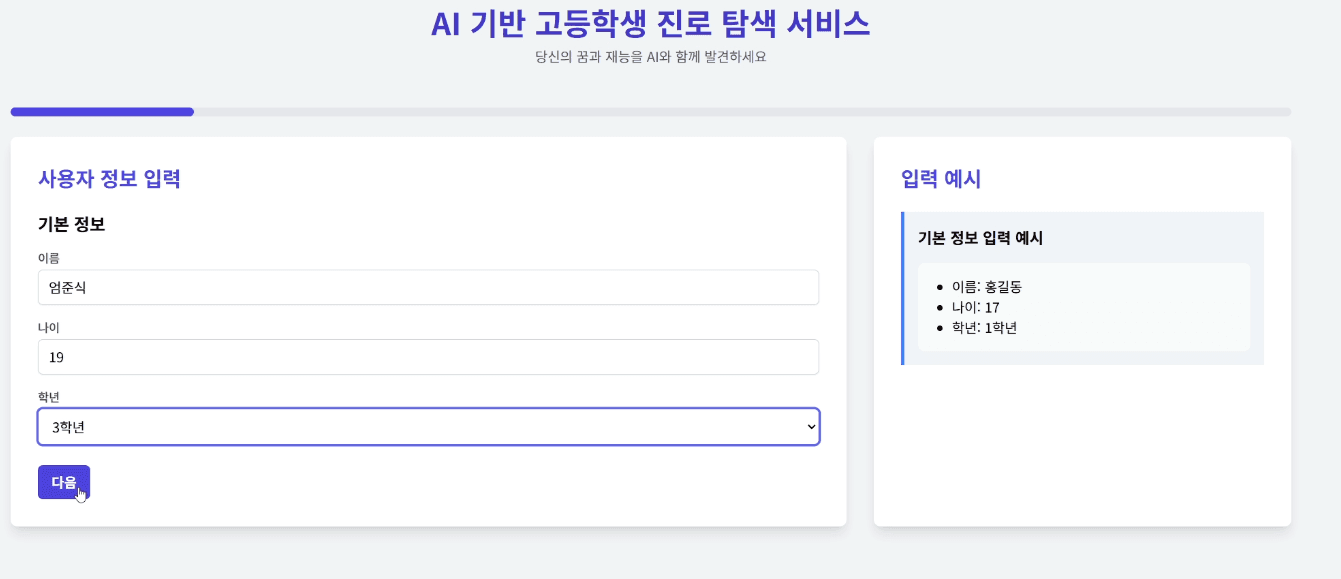
I built the main page quickly with Bootstrap. It was easy to make it responsive, and I included a welcome message and service introduction, a button to start chatting, a usage guide, and recent counseling history for logged-in users.
Chat interface

The chat screen included several features so it felt like an actual counseling session:
- Live message display
- Different styles for user and AI responses
- An input field and send button
- Automatic scrolling through the conversation
- A loading indicator
<!-- Main section of index.html -->
<div class="chat-container">
  <div class="chat-messages" id="messageArea">
    <!-- Messages are added here dynamically -->
  </div>
  <div class="input-area">
    <input type="text" id="userInput" placeholder="Enter your question..." />
    <button onclick="sendMessage()">Send</button>
  </div>
</div>
5. Connecting Claude API
API call
# app/utils.py
import anthropic

def get_claude_response(message):
    client = anthropic.Client(api_key=os.getenv('ANTHROPIC_API_KEY'))

    try:
        response = client.messages.create(
            model="claude-3-opus-20240229",
            max_tokens=1000,
            messages=[{
                "role": "user",
                "content": message
            }]
        )
        return response.content[0].text
    except Exception as e:
        return f"Error: {str(e)}"
Prompt design
I designed a separate prompt for career counseling. Sending only “give me counseling” produced an answer that was too broad, so I passed student information and counseling criteria together.
def engineer_prompt(user_info, user_message):
    system_prompt = """You are an experienced career-counseling AI for high-school students.

Consider these areas during counseling:

1. Academic ability
- Analyze achievement and preferences by subject
- Analyze learning style and study attitude
- Consider activities outside class and self-directed learning
- Consider experience with advanced study in a specific field

2. Aptitude and interests
- Use MBTI and job-fit as one input, not a diagnosis
- Connect hobbies and interests to possible careers
- Consider club and school activities
- Consider volunteer work and civic participation

3. Career exploration and planning
- Provide information about desired job families
- Explain required skills and qualifications
- Introduce related majors and curricula
- Suggest admissions and preparation strategies

4. Skills-development plan
- Suggest study strategies
- Plan relevant certificates and preparation
- Improve foreign-language and computer skills
- Suggest reading and general-education activities

5. Psychological support
- Suggest ways to manage academic stress
- Give advice for career anxiety
- Strengthen confidence and motivation
- Support a positive self-image

6. Future outlook
- Explain industry trends in the field of interest
- Discuss promising future occupations
- Explain how technology may change work
- Connect social change with career adaptability

7. Practical action plan
- Short-term goals (6 months to 1 year)
- Mid-term goals (1 to 3 years)
- Long-term goals (3 to 5 years)
- Concrete actions and a timeline"""

    user_context = f"""
# Basic student information
- Name: {user_info['name']}
- Age: {user_info['age']}
- Grade: {user_info['grade']}
- Academic track: {user_info['academic_track']}

# Academic status
- Performance: {user_info['academic_performance']}
- Favorite subject: {user_info['favorite_subject']}
- Disliked subject: {user_info['disliked_subject']}
- Learning style: {user_info.get('learning_style', 'No information')}

# Career exploration
- Interests: {user_info['interests']}
- Career interests: {user_info['career_interests']}
- Desired future job: {user_info['future_job']}
- Role model: {user_info['role_model']}"""

    return system_prompt + "\n\n" + user_context + "\n\nStudent message: " + user_message
Response structure
<h2>Overall analysis</h2>
[Professional analysis of the student's traits and situation]

<h2>Career-fit assessment</h2>
[How the desired path matches current abilities]

<h2>Personal development plan</h2>
[Step-by-step goals and actions]

<h2>Recommended materials</h2>
[Personalized learning materials and activities]
Fixing those four headings in advance mattered. Without them the length and the order of the answer changed every time, which made it awkward to drop into the page.
What I changed while refining the prompt
The biggest win was breaking the student's information into fields instead of writing it as prose. A line like "a second-year science-track student who likes maths" leaked less reliably than grade: 2 and track: science on separate lines.
I tried feeding in MBTI and never decided whether it helped. It shifted the tone of the answer, but not the substance, so I left it as optional.
What clearly hurt was putting instructions like "be specific" in the prompt. That produced longer generalities. Fixing the output sections instead got me specificity for free.
6. Connecting the Database
SQLAlchemy model
from app import db

class ChatHistory(db.Model):
    id = db.Column(db.Integer, primary_key=True)
    user_message = db.Column(db.Text, nullable=False)
    ai_response = db.Column(db.Text, nullable=False)
    timestamp = db.Column(db.DateTime, default=datetime.utcnow)
Saving and loading conversations
def save_chat(user_message, ai_response):
    chat = ChatHistory(
        user_message=user_message,
        ai_response=ai_response
    )
    db.session.add(chat)
    db.session.commit()
7. Security and Error Handling
API-key security
- Use environment variables.
- Add
.envto.gitignore. - Keep production security settings separate.
Error handling
@app.errorhandler(500)
def internal_error(error):
    return jsonify({
        'error': 'Internal server error',
        'message': str(error)
    }), 500
8. Preparing for Deployment
Production settings
# config.py
class ProductionConfig(Config):
    DEBUG = False
    SQLALCHEMY_DATABASE_URI = os.getenv('DATABASE_URL')
Running the server
gunicorn run:app
Closing Thoughts
Building this project taught me that simply “adding a chatbot” requires more structure than I expected. API-key management, prompt design, conversation storage, and error handling all have to be handled before the result is actually usable.
The areas I practiced were Flask, API integration and asynchronous handling, database design, frontend interfaces, and security and error handling.
If I improved it further, I would add:
- User authentication
- Counseling-history analysis and reports
- Multilingual support
- A voice interface
- A mobile-app version
The full source is available on GitHub. There are still many things I would clean up, but connecting Claude API to a real service was valuable practice.